UniversalFree
0 Likes
AntiSitDexx
Universal Script 📌
 Alessssiooo
AntisitInf moneyAdminUniversal
Description
Anti sit
-- Servidores y variables principales
local Players = game:GetService("Players")
local RunService = game:GetService("RunService")
local UserInputService = game:GetService("UserInputService")
local TweenService = game:GetService("TweenService")

local player = Players.LocalPlayer
local character = player.Character or player.CharacterAdded:Wait()
local humanoid = character:WaitForChild("Humanoid")

-- ScreenGui Principal (Para el Menú)
local screenGui = Instance.new("ScreenGui")
screenGui.Name = "AntiSeatGui_Dex"
screenGui.ResetOnSpawn = false
screenGui.DisplayOrder = 10
local success, coreGui = pcall(function() return game:GetService("CoreGui") end)
screenGui.Parent = success and coreGui or player:WaitForChild("PlayerGui")

-- ScreenGui Exclusivo para la Intro (DisplayOrder máximo para tapar TODO)
local introGui = Instance.new("ScreenGui")
introGui.Name = "IntroGui_Dex"
introGui.ResetOnSpawn = false
introGui.DisplayOrder = 9999999 -- Prioridad absoluta sobre cualquier UI
introGui.IgnoreGuiInset = true -- Fuerza a que tape también la barra superior de Roblox
introGui.Parent = success and coreGui or player:WaitForChild("PlayerGui")

-- Variables de estado
local antiSeatEnabled = false

-- ==========================================
-- =    PANTALLA DE INTRO ABSOLUTA (10s)    =
-- ==========================================

local introFrame = Instance.new("Frame")
introFrame.Size = UDim2.new(1, 0, 1, 0)
introFrame.BackgroundColor3 = Color3.fromRGB(0, 0, 0)
introFrame.BorderSizePixel = 0
introFrame.Parent = introGui

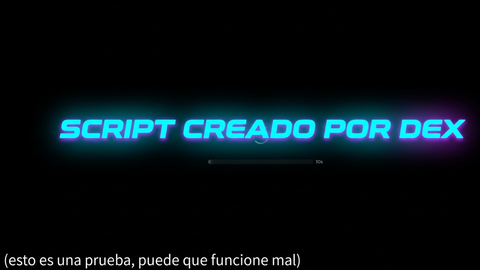
-- Texto Neón Central
local neonLabel = Instance.new("TextLabel")
neonLabel.Size = UDim2.new(0.8, 0, 0, 100)
neonLabel.Position = UDim2.new(0.1, 0, 0.5, -50)
neonLabel.BackgroundTransparency = 1
neonLabel.Text = "SCRIPT CREADO POR DEX"
neonLabel.TextColor3 = Color3.fromRGB(0, 255, 255)
neonLabel.TextSize = 40
neonLabel.Font = Enum.Font.Arcade
neonLabel.TextWrapped = true
neonLabel.Parent = introFrame

-- Efecto Neón (Pulso)
local function pulseNeon()
    local tInfo = TweenInfo.new(1, Enum.EasingStyle.Sine, Enum.EasingDirection.InOut, -1, true)
    local goal = {TextColor3 = Color3.fromRGB(255, 0, 255)}
    local tween = TweenService:Create(neonLabel, tInfo, goal)
    tween:Play()
end
pulseNeon()

-- Texto de Prueba Abajo a la Izquierda
local testLabel = Instance.new("TextLabel")
testLabel.Size = UDim2.new(0.6, 0, 0, 30)
testLabel.Position = UDim2.new(0, 20, 1, -50) -- Ajustado para pantallas sin bordes
testLabel.BackgroundTransparency = 1
testLabel.Text = "(esto es una prueba, puede que funcione mal)"
testLabel.TextColor3 = Color3.fromRGB(200, 200, 200)
testLabel.TextSize = 16
testLabel.Font = Enum.Font.SourceSans
testLabel.TextXAlignment = Enum.TextXAlignment.Left
testLabel.Parent = introFrame

-- Temporizador de 10 segundos y eliminación completa de la intro
task.spawn(function()
    task.wait(10)
    local fadeInfo = TweenInfo.new(1, Enum.EasingStyle.Linear)

    TweenService:Create(introFrame, fadeInfo, {BackgroundTransparency = 1}):Play()
    TweenService:Create(neonLabel, fadeInfo, {TextTransparency = 1}):Play()
    TweenService:Create(testLabel, fadeInfo, {TextTransparency = 1}):Play()

    task.wait(1)
    introGui:Destroy() -- Elimina por completo la UI de intro y libera la pantalla
end)

-- ==========================================
-- =        FUNCIONAMIENTO ANTI-ASIENTO     =
-- ==========================================

local function toggleAntiSeat(state)
    antiSeatEnabled = state
    if antiSeatEnabled then
        humanoid:SetStateEnabled(Enum.HumanoidStateType.Seated, false)
        if humanoid.Sit then humanoid.Sit = false end
    else
        humanoid:SetStateEnabled(Enum.HumanoidStateType.Seated, true)
    end
end

player.CharacterAdded:Connect(function(newCharacter)
    character = newCharacter
    humanoid = newCharacter:WaitForChild("Humanoid")
    if antiSeatEnabled then
        humanoid:SetStateEnabled(Enum.HumanoidStateType.Seated, false)
    end
end)

RunService.Heartbeat:Connect(function()
    if antiSeatEnabled and character and humanoid then
        if humanoid.Sit then
            humanoid.Sit = false
        end
        local ray = Ray.new(character.PrimaryPart.Position, Vector3.new(0, -3, 0))
        local hitPart = workspace:FindPartOnRay(ray, character)
        if hitPart and (hitPart:IsA("Seat") or hitPart:IsA("VehicleSeat")) then
            hitPart.Disabled = true
        end
    end
end)

-- ==========================================
-- =          INTERFAZ DEL MENÚ             =
-- ==========================================

-- Botón Flotante
local openBtn = Instance.new("TextButton")
openBtn.Size = UDim2.new(0, 60, 0, 60)
openBtn.Position = UDim2.new(0, 20, 0.4, 0)
openBtn.BackgroundColor3 = Color3.fromRGB(30, 30, 35)
openBtn.TextColor3 = Color3.fromRGB(255, 255, 255)
openBtn.TextSize = 18
openBtn.Text = "Menu"
openBtn.Font = Enum.Font.SourceSansBold
openBtn.BorderSizePixel = 0
openBtn.Visible = false -- Se mantiene oculto bajo la pantalla negra
openBtn.Parent = screenGui

local openCorner = Instance.new("UICorner")
openCorner.CornerRadius = UDim.new(0, 15)
openCorner.Parent = openBtn

-- Menú Principal
local mainFrame = Instance.new("Frame")
mainFrame.Size = UDim2.new(0, 240, 0, 160)
mainFrame.Position = UDim2.new(0.5, -120, 0.4, -80)
mainFrame.BackgroundColor3 = Color3.fromRGB(20, 20, 25)
mainFrame.BorderSizePixel = 0
mainFrame.Visible = false
mainFrame.Parent = screenGui

local mainCorner = Instance.new("UICorner")
mainCorner.CornerRadius = UDim.new(0, 20)
mainCorner.Parent = mainFrame

local titleLabel = Instance.new("TextLabel")
titleLabel.Size = UDim2.new(1, 0, 0, 45)
titleLabel.BackgroundTransparency = 1
titleLabel.Text = "Anti-Seat System"
titleLabel.TextColor3 = Color3.fromRGB(255, 255, 255)
titleLabel.TextSize = 20
titleLabel.Font = Enum.Font.SourceSansBold
titleLabel.Parent = mainFrame

local toggleBtn = Instance.new("TextButton")
toggleBtn.Size = UDim2.new(0.85, 0, 0, 50)
toggleBtn.Position = UDim2.new(0.075, 0, 0.5, 0)
toggleBtn.BackgroundColor3 = Color3.fromRGB(150, 40, 40)
toggleBtn.Text = "OFF"
toggleBtn.TextColor3 = Color3.fromRGB(255, 255, 255)
toggleBtn.TextSize = 18
toggleBtn.Font = Enum.Font.SourceSansBold
toggleBtn.BorderSizePixel = 0
toggleBtn.Parent = mainFrame

local toggleCorner = Instance.new("UICorner")
toggleCorner.CornerRadius = UDim.new(0, 12)
toggleCorner.Parent = toggleBtn

-- Mostrar el botón del menú solo cuando la intro termine
task.spawn(function()
    task.wait(10.5)
    openBtn.Visible = true
end)

-- Interacciones
openBtn.MouseButton1Click:Connect(function()
    mainFrame.Visible = not mainFrame.Visible
    openBtn.Text = mainFrame.Visible and "X" or "Menu"
end)

toggleBtn.MouseButton1Click:Connect(function()
    local newState = not antiSeatEnabled
    toggleAntiSeat(newState)
    if newState then
        toggleBtn.BackgroundColor3 = Color3.fromRGB(40, 150, 40)
        toggleBtn.Text = "ON"
    else
        toggleBtn.BackgroundColor3 = Color3.fromRGB(150, 40, 40)
        toggleBtn.Text = "OFF"
    end
end)

-- Sistema de arrastre táctil
local function makeDraggable(gui)
    local dragging, dragInput, dragStart, startPos
    gui.InputBegan:Connect(function(input)
        if input.UserInputType == Enum.UserInputType.MouseButton1 or input.UserInputType == Enum.UserInputType.Touch then
            dragging = true
            dragStart = input.Position
            startPos = gui.Position
            input.Changed:Connect(function()
                if input.UserInputState == Enum.UserInputState.End then dragging = false end
            end)
        end
    end)
    gui.InputChanged:Connect(function(input)
        if input.UserInputType == Enum.UserInputType.MouseMovement or input.UserInputType == Enum.UserInputType.Touch then
            dragInput = input
        end
    end)
    UserInputService.InputChanged:Connect(function(input)
        if input == dragInput and dragging then
            local delta = input.Position - dragStart
            gui.Position = UDim2.new(startPos.X.Scale, startPos.X.Offset + delta.X, startPos.Y.Scale, startPos.Y.Offset + delta.Y)
        end
    end)
end

makeDraggable(openBtn)
makeDraggable(mainFrame)